
Your GitHub Actions Runners Are Slow And You Are Paying Too Much For Them.
How I made GitHub Actions 3x faster by changing just 1 line

Disclosure: This post contains a paid partnership with Depot. I tested the product myself before writing about it.

As a DevOps engineer, I spend a lot of time building and managing CI/CD pipelines, and GitHub Actions is my go-to CI tool these days.
I love GitHub Actions for its simplicity, seamless integration with almost everything, and the great marketplace. And even the built-in DevSecOps features with CodeQL.
One thing that bothers me about GitHub Actions is the runner’s problem.
If you want to use GitHub Actions, you have 2 choices.
Either use the slow default GitHub (Azure-hosted) runners. These are very costly (even after 30% discount Microsoft announced to encourage people to use their slow runners).
Or go through the painful setup of running self-hosted runners on Kubernetes or on a bunch of ev’s under an autoscaling group.
And both ways are problematic. Let me explain.
The Real Problem with GitHub’s default hosted runners
When you use GitHub’s default hosted runners, you are on shared machines. Shared with other organizations. Shared with other workloads. Running on older CPU generations.
Your Docker build takes 10 minutes. You run 100 builds a day. That is 1,000 minutes. Per day. Per month, you are pushing serious build time just waiting.

GitHub rounds up to the nearest minute. Build finishes in 4 minutes 10 seconds, but you get charged for 5.
Every single time. At 100 builds a day over a month, that rounding itself burns a hole in your pocket.
And they are slow, even with the build cache. When you use actions/cache, upload, and download, speed runs around 145 MiB/s. That sounds fine until your node_modules or Docker layer archive is 3 GB.
Now you are waiting 20 seconds just to restore the cache before your build even starts. Every run. On top of that, there is a 10 GB total cache limit per repo. Large caches get evicted more than you expect.
For Docker builds, it gets worse. Layer cache does not persist between runs by default. You have to manually configure cache-from and cache-to.
And even then, it uploads as a tarball over the network, then downloads and unpacks on the next run. You are paying the network cost twice on every single build.
Self-Hosted Runners Are Not the Answer Either
I have seen teams hit these problems and immediately jump to self-hosted runners on EC2(with autoscaling), or to Kubernetes (using huge Docker images)
“It is free, right?” No. It is not.
You pay for the computer, storage, and egress. And if you are not careful about what is leaving your runners, that bandwidth cost sneaks up on you.
But the real cost is not the money. It is the human cost.
Someone on your team has to manage those runners. Configure them. Patch them. Troubleshoot them. Monitor them. Keep them alive.
And figure out why a runner randomly stopped picking up jobs at 2 am while developers were yelling on Slack.
You are not building anything when you are doing that. You are just keeping the lights on.
And now, from March 2026, Microsoft is adding a $0.002 per minute platform charge on self-hosted runners. So even the “free” option is not free anymore.
Two options. Both have problems.
Hosted runners: convenient but slow and expensive at scale.
Self-hosted runners: cheaper per minute, but now you are an infrastructure team on top of being a DevOps team.
People need better options.
Then I Found Depot
I was looking for something that solved both problems at once.
Fast runners. No infrastructure to manage. Fair pricing.
That is when I came across Depot, and it seems to be solving the runner problems.
Fast runners that don’t cost us a fortune, and without the cost of self-hosted runners.
Depot runners are 2-3x faster than GitHub Action default runners.
The setup is literally one line in your workflow file.
Before Depot
runs-on: ubuntu-latestAfter Depot
runs-on: depot-ubuntu-latestThat is it. One line. Your existing workflow, your existing steps, your existing secrets. Nothing else changes.
You stay on GitHub Actions. You just change where the job runs.
What Depot Is Actually Doing
Let me break down what happens under the hood, because marketing numbers alone mean nothing.
When you trigger a job with a Depot runner label, GitHub sends a webhook to Depot’s system.
Depot takes a pre-warmed EC2 instance from a standby pool. Not a cold boot. A pre-warmed instance. It assigns it to your job.
The instance is single-tenant, meaning your build is not sharing compute with another company’s workload. The job runs. The instance gets terminated.
These machines run on 4th Gen AMD EPYC Genoa CPUs. Around 30% faster than GitHub’s runners for CPU-bound work like compilation, bundling, and test execution.
But here is the part I find most interesting. Depot allocates up to 25% of the instance’s RAM as a RAM disk and mounts it as the working directory.
RAM disks are orders of magnitude faster than SSDs for I/O operations. So anything that reads and writes files, which is basically every build step, gets faster. Git clone. npm install. Docker layer operations. Everything.
Their runners sit in AWS us-east-1 with 12.5 Gbps network throughput. GitHub’s infrastructure is also heavily concentrated there. Less latency. Faster artifact operations. Faster checkouts.
And for caching, Depot replaced the GitHub cache backend entirely.
When your workflow uses actions/cache, entries go to Depot’s distributed storage. Cache upload and download runs at up to 1,000 MiB/s.
That is roughly 7x GitHub’s 145 MiB/s. The 10 GB limit is gone. Cache what you need.
Runner startup is under 5 seconds. GitHub’s runners can take close to a minute, depending on queue depth.
The Docker Build Problem Is Solved Differently
Depot has a separate product for container builds. Not just faster runners. A completely different approach to how Docker images are built.
Depot Builds Your Docker Images Up to 40x Faster
When you replace docker build with depot build, the build context goes to a remote BuildKit instance managed by Depot. These instances have 16 CPUs and 32 GB of memory by default. And the Docker layer cache is stored on a persistent NVMe SSD attached to the builder.
Here is why that matters.
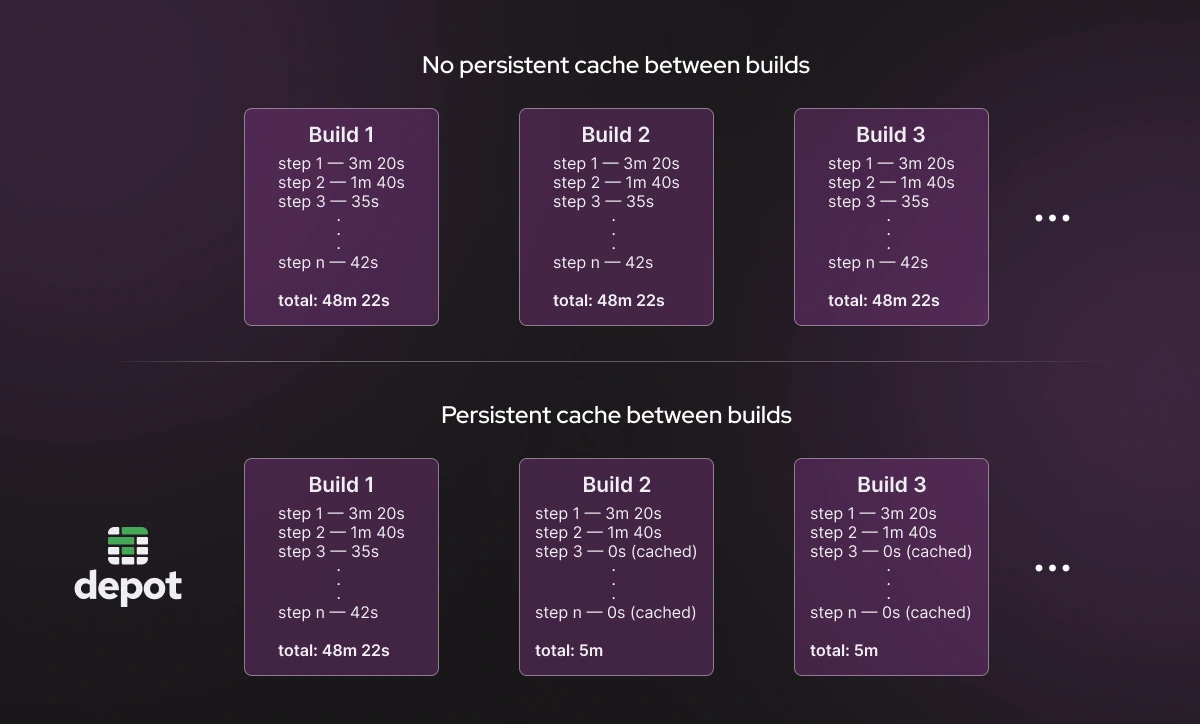
In normal CI, the layer cache gets saved and loaded over the network on every single run. With Depot, the cache lives on the builder’s disk permanently. No upload. No download. No tarball. The cache is just there, instantly, for every build.
It is also shared across your whole team. If a developer builds the image locally before opening a pull request, the CI build reuses those cached layers.
I have seen this take a build that was 8–10 minutes and bring it to under 30 seconds once the cache is warm.
The Multi-Platform Build Story
If you have ever tried to build a Docker image for both AMD64 and ARM64 in GitHub Actions, you know what QEMU emulation feels like.
QEMU is a software CPU emulator. It lets you build an ARM image on an Intel machine by pretending to be ARM. It works.
But it is painfully slow. A step that takes 3 minutes on native ARM can take 30–45 minutes under QEMU. I have seen documented cases of 30x slowdowns.
The workaround is to run your own ARM builder, an EC2 Graviton instance registered as a self-hosted runner. But now you are managing infrastructure again.
Depot removes QEMU entirely. When you specify — platform linux/amd64,linux/arm64, they route each platform to a builder running on native hardware.
Intel builder for AMD64. ARM builder for ARM64.
Both are running simultaneously in parallel. No emulation. No extra infrastructure. You get a proper multi-platform manifest without paying the emulation penalty.
Let’s Talk Numbers
Claims are easy to make, but difficult to support with real evidence. Here are some real numbers to support the claim.
On a Next.js build that takes 4 minutes on GitHub (billed as 5 due to rounding), Depot completes it in around 2 minutes and bills you for exactly 2 minutes, tracked per second.
At 100 builds per day over 30 days, that works out to over 50 hours of build time saved per month and over $80 in runner cost savings on a comparable codebase.
For Docker specifically, teams have reported going from 8 minutes to 20 seconds after the cache is warm. One team brought a 30-minute build to under 4 minutes, with subsequent cached builds around 12 seconds.
And Depot’s runners are priced at half the cost per minute of GitHub-hosted runners. Plus per-second billing. No rounding. The cost difference at scale is significant.
Who Sees the Biggest Gains
See, this is not the magic wand that will solve problems for everyone in the same way. Some will get huge benefits, some will get less.
If you are building Docker images in CI, especially multi-platform images with QEMU emulation, switching to Depot’s container builds will probably be the single highest-impact change you make to your pipeline.
The jump from emulated ARM to native ARM alone can be 10–30x faster.
If you have large dependency installs, Node.js monorepos, Java with Maven or Gradle, Rust workspaces, the faster cache throughput directly cuts your wall clock time on every cache-hit run.
If your team is growing and you are hitting concurrency limits on GitHub’s plans, Depot has no concurrency limits.
If someone on your team is currently babysitting self-hosted runner infrastructure, the operational savings are real, even before you count build time.
Depot is not replacing GitHub Actions. They are not building another CI tool
Depot is not a migration to a new CI system. You do not rewrite your workflows. You do not learn a new YAML schema. You stay on GitHub Actions.
The only thing that changes is the runners. The underlying compute where your builds run.
For runners, it is changing the runs-on label.
For Docker builds, it is replacing docker build with depot build, or swapping docker/build-push-action for depot/build-push-action in your existing workflow.
OIDC authentication works. Your secrets work. Your matrix strategies work. Everything you have already built stays exactly as it is.
Final words
The problems with GitHub Actions are not configuration problems. You cannot optimize your way out of slow CPU performance or network-limited cache throughput.
These are infrastructure problems. And you should not have to manage that infrastructure yourself just to get a reasonable build time.
Depot owns that infrastructure layer, so you do not have to. Fast machines. Persistent cache. Native multi-platform builds. No concurrency limits. Half the cost.
Depot offers a 7-day free trial with no credit card required. Change one line in your workflow file and run a build. You will see the difference immediately.