
Stop putting AWS keys in GitHub Actions secrets before a security incident hits you in the face
We should never use long-lived AWS credentials in CI/CD. It’s a disaster waiting to happen


Most teams put their AWS_ACCESS_KEY_ID AWS_SECRET_ACCESS_KEY in GitHub Actions Secrets. It works. But those keys live forever, they rarely get rotated, and the blast radius is huge if something goes wrong (given that people give admin-level permissions to those)
There is a better way. OpenID Connect (OIDC) lets GitHub Actions authenticate with AWS using short-lived tokens. No keys stored anywhere. Setup takes about 20 minutes.
This guide covers what OIDC is, how to configure it with Terraform, a working ECR push example, and the common errors you will hit.
TL;DR — Create an OIDC provider in AWS, create an IAM role with a trust policy scoped to your GitHub repo and branch, attach the permissions your workflow needs, and reference the role ARN in your workflow. No
AWS_ACCESS_KEY_ID. NoAWS_SECRET_ACCESS_KEY.
If you are planning to transition into Devops/MLops/AIops from another domain, then consider my real-world production projects and live, troubleshooting-based.
25-Week AWS DevOps + MLOPS + AIOPS Bootcamp with Real World Projects
What is OIDC, and how does it work with AWS?
OIDC is a way to set up trust between two systems — like GitHub and AWS — when there is no human in between. You create an identity provider in AWS, then an IAM role, and then you tell that role: “Only this specific GitHub repo on this branch is allowed to assume you.”
Once that’s done, your workflow stops needing a long-lived access key. It shows up at AWS, says “I am the main branch of this repo, here is my token to prove it,” and AWS hands back temporary credentials that expire in one hour.
What happens behind the scenes when your workflow runs:
Workflow asks GitHub’s OIDC provider for a token
GitHub gives a short-lived JWT signed by GitHub itself
Workflow sends that JWT to AWS STS via
sts:AssumeRoleWithWebIdentityAWS checks the token claims against your IAM role’s trust policy
If everything matches, AWS returns temporary credentials valid for 1 hour
Workflow uses them. They expire. Gone.
If those credentials leak somehow, they are useless 60 minutes later. That is the whole point.
Set up with Terraform
Five files. Apply once. Done.
github-oidc-aws/
├── version.tf
├── variables.tf
├── locals.tf
├── main.tf
└── iam.tf
version.tf
terraform {
  required_version = “~> 1.8.1”
  required_providers {
    aws = {
      source  = “hashicorp/aws”
      version = “~> 5.0”
    }
  }
}

terraform {
  backend “s3” {
    bucket  = “your-tfstate-bucket-name”
    key     = “github-oidc-aws/terraform.tfstate”
    region  = “ap-south-1”
    encrypt = true
  }
}
provider “aws” {
  region = var.aws_region
}
Use a remote backend for state. Don’t keep terraform.tfstate on your laptop.
variables.tf
variable “aws_region” {
  type    = string
  default = “ap-south-1”
}
locals.tf and main.tf — the OIDC provider and IAM role
locals {
  github_repo = [
    { user = “your-github-org”, repo = “your-app-repo”,   branch = “main” },
    { user = “your-github-org”, repo = “your-infra-repo”, branch = “main” },
  ]
# GitHub Actions OIDC subject format: repo:OWNER/REPO:ref:refs/heads/BRANCH
  github_oidc_subjects = distinct([
    for r in local.github_repo : “repo:${r.user}/${r.repo}:ref:refs/heads/${r.branch}”
  ])
}
# Create IAM identity provider for GitHub -> AWS
# Create IAM policy that allows the workflow to do what it needs
# Create IAM role that the web identity can assume
# Attach the IAM policy to the role
# In the workflow -> use the role ARN instead of access keys
resource “aws_iam_openid_connect_provider” “github_actions” {
  url = “https://token.actions.githubusercontent.com”
  client_id_list = [
    “sts.amazonaws.com”
  ]
  # Thumbprint is no longer required as of July 2023.
  # AWS now trusts GitHub’s root CA directly.
  # thumbprint_list = [
  #   “6938fd4d98bab03faadb97b34396831e3780aea1”
  # ]
  tags = {
    Name = “github-actions-oidc”
  }
}
resource “aws_iam_role” “github_oidc_role” {
  name = “github-oidc-role”
  assume_role_policy = jsonencode({
    Version = “2012-10-17”
    Statement = [
      {
        Effect = “Allow”
        Principal = {
          Federated = aws_iam_openid_connect_provider.github_actions.arn
        }
        Action = “sts:AssumeRoleWithWebIdentity”
        Condition = {
          StringLike = {
            “token.actions.githubusercontent.com:sub” = local.github_oidc_subjects
            “token.actions.githubusercontent.com:aud” = “sts.amazonaws.com”
          }
        }
      }
    ]
  })
  tags = {
    Name = “github-oidc-role”
  }
}
resource “aws_iam_role_policy_attachment” “attach_admin” {
  role       = aws_iam_role.github_oidc_role.name
  policy_arn = “arn:aws:iam::aws:policy/AdministratorAccess”
}
output “aws_iam_role_arn” {
  value = aws_iam_role.github_oidc_role.arn
}
When your workflow runs, it will authenticate with AWS using OIDC

Two things are worth mentioning here —
The locals.tf pattern. Adding a new repo or branch is one line. Terraform builds the full subject list from local.github_repo and feeds it into the trust policy condition. No manual JSON editing.
Admin permissions. I attached AdministratorAccess here. In production this is fine only because the trust policy is locked to specific repos and specific branches. If your trust policy says repo:org/repo:*, do not attach admin. The trust policy is your real security boundary, not the IAM permissions.
For least-privilege setups, replace the admin attachment with a scoped policy. ECR push only:
resource “aws_iam_policy” “ecr_policy” {
  name = “github-actions-ecr-push-pull”
  policy = jsonencode({
    Version = “2012-10-17”
    Statement = [{
      Effect = “Allow”
      Action = [
        “ecr:GetAuthorizationToken”,
        “ecr:BatchCheckLayerAvailability”,
        “ecr:GetDownloadUrlForLayer”,
        “ecr:BatchGetImage”,
        “ecr:InitiateLayerUpload”,
        “ecr:UploadLayerPart”,
        “ecr:CompleteLayerUpload”,
        “ecr:PutImage”
      ]
      Resource = “*”
    }]
  })
}
Apply it
terraform init
terraform apply
The output gives you the role ARN you will use in the workflow.
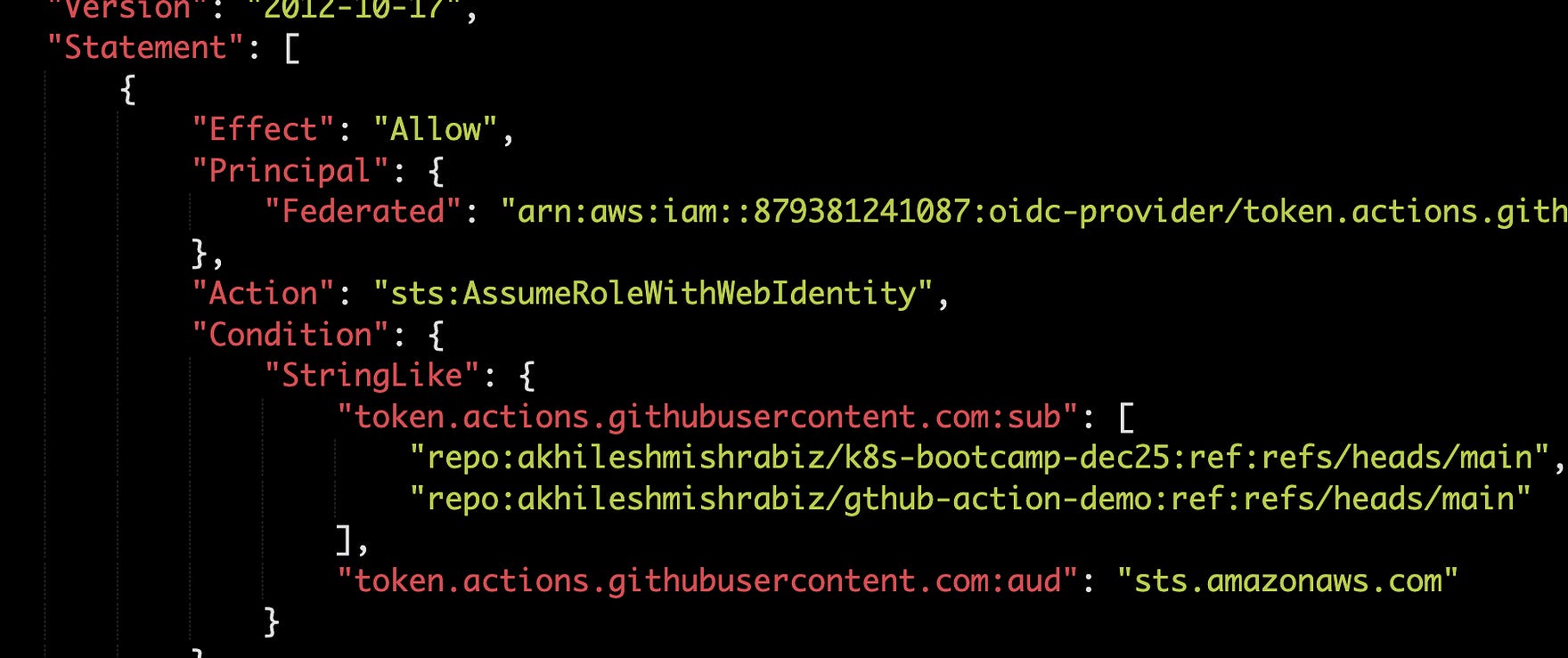
This is how your trust policy looks after Terraform apply. You can see the sub and audio pattern
So What are sub and aud?
You will see sub and aud everywhere in the trust policy. Get them wrong, nothing works.
When the workflow authenticates with AWS, it sends a request. That request is not just from “GitHub” in general — it is from a specific repo, on a specific branch, in a specific user’s account.
sub (Subject) — who is sending the request. Format: repo:<org>/<repo>:<context>. The context tells AWS whether the run came from a push to main, a tag, a PR, or an environment. You match against this to lock the role down to one repo and one branch.
aud (Audience) — who is supposed to listen. Think of it like 10 hats sitting on a table. Each hat gives different permissions. When you wear one, you become whatever that hat allows. AWS STS works the same way — when your workflow says “I want to assume this role,” AWS gives a temporary token for that session. The aud field tells AWS which service the request is for, and for AWS it is always sts.amazonaws.com.
sub says who is sending, aud says who is supposed to listen. AWS checks both before letting the workflow in.
A trust policy detail that will burn you
Look at this condition:
“token.actions.githubusercontent.com:sub” = “repo:your-github-org/your-app-repo:ref:refs/heads/main”This is not a wildcard. Only workflows from the main branch of that one repo can assume the role. Not feature branches. Not forks. Not random PRs.
Most tutorials use repo:org/repo:* and call it done. That works, but if any repo in your org gets compromised — someone pushes malicious code, a contributor account gets taken over — the attacker can assume your AWS role from any branch they create.
Here are some common patterns:
repo:org/repo:* Any branch, tag, environment, PR (avoid in production)
repo:org/repo:ref:refs/heads/main Only the main branch
repo:org/repo:ref:refs/heads/release/* Any release/* branch (use StringLike)
repo:org/repo:environment:production Only when the workflow uses the production environment
repo:org/repo:pull_request Only pull request workflows repo:org/repo:ref:refs/tags/v* Tag-based releases (use StringLike)
Note for production: Use StringEquals for exact matches and StringLike only when there is a wildcard (*). Mixing them up is the #1 reason for the Not authorized to perform sts:AssumeRoleWithWebIdentity error.
For multiple branches, you cannot keep stacking conditions. AWS expects an array of subjects in one condition — that is what local.github_oidc_subjects does in the Terraform above.
Use the role in your GitHub Actions workflow
Two ECR repos for the example:
aws ecr create-repository --repository-name myapp/frontend
aws ecr create-repository --repository-name myapp/backend
The workflow:
name: Build and Push Docker Images
on:
  push:
    branches: [ main ]
  workflow_dispatch:
env:
  AWS_REGION: ap-south-1
  ECR_REPOSITORY_FRONTEND: myapp/frontend
  ECR_REPOSITORY_BACKEND: myapp/backend
  IMAGE_TAG: latest
jobs:
  build-and-push:
    runs-on: ubuntu-latest
    permissions:
      id-token: write
      contents: read
    steps:
      - uses: actions/checkout@v3
      - name: Configure AWS credentials
        uses: aws-actions/configure-aws-credentials@v3
        with:
          aws-region: ${{ env.AWS_REGION }}
          role-to-assume: arn:aws:iam::123456789012:role/github-oidc-role
      - name: Login to Amazon ECR
        id: login-ecr
        uses: aws-actions/amazon-ecr-login@v1
      - name: Build and push frontend image
        working-directory: ./frontend
        env:
          ECR_REGISTRY: ${{ steps.login-ecr.outputs.registry }}
        run: |
          docker build --platform=linux/amd64 \
            -t $ECR_REGISTRY/$ECR_REPOSITORY_FRONTEND:$IMAGE_TAG .
          docker push $ECR_REGISTRY/$ECR_REPOSITORY_FRONTEND:$IMAGE_TAG
      - name: Build and push backend image
        working-directory: ./backend
        env:
          ECR_REGISTRY: ${{ steps.login-ecr.outputs.registry }}
        run: |
          docker build --platform=linux/amd64 \
            -t $ECR_REGISTRY/$ECR_REPOSITORY_BACKEND:$IMAGE_TAG .
          docker push $ECR_REGISTRY/$ECR_REPOSITORY_BACKEND:$IMAGE_TAG
Make sure to add:
permissions:
  id-token: write
Without this, the workflow cannot request an OIDC token. You will get Not authorized to perform sts:AssumeRoleWithWebIdentity error even when everything else is correct.
role-to-assume: arn:aws:iam::123456789012:role/github-oidc-roleThat is where access keys used to live. No AWS_ACCESS_KEY_ID, no AWS_SECRET_ACCESS_KEY, no ${{ secrets.* }} for AWS.
Common errors and fixes
Not authorized to perform sts:AssumeRoleWithWebIdentity
Five things to check:
1. Missing permissions: id-token: write in the job. Add it.
2. Trust policy sub doesn’t match the workflow’s actual claim. Decode the live token to see what GitHub is sending:
- name: Debug OIDC token claims
  run: |
    TOKEN=$(curl -s -H “Authorization: bearer $ACTIONS_ID_TOKEN_REQUEST_TOKEN” \
      “$ACTIONS_ID_TOKEN_REQUEST_URL&audience=sts.amazonaws.com” | jq -r ‘.value’)
    echo $TOKEN | cut -d ‘.’ -f2 | base64 -d 2>/dev/null | jq .
Compare the sub field in the output to your trust policy condition.
3. Using StringEquals with a wildcard. StringEquals is literal. If the value contains *, switch to StringLike.
4. Wrong audience. Must be exactly sts.amazonaws.com when using aws-actions/configure-aws-credentials.
5. Wrong role ARN. Triple-check the account ID and role name in the workflow.
Workflow works on main but fails on PRs
PRs use a different sub claim — repo:org/repo:pull_request instead of ref:refs/heads/main. If you want PRs to assume the role, add it explicitly. Be careful — fork PRs can then trigger your AWS role. Use GitHub Environments with required reviewers for production.
Thumbprint mismatch on older setups
Setups created before mid-2023 may have an outdated thumbprint pinned. AWS now trusts GitHub’s root CA, so the thumbprint is optional. Either remove it or fetch dynamically:
data “tls_certificate” “github” {
  url = “https://token.actions.githubusercontent.com/.well-known/openid-configuration”
}

resource “aws_iam_openid_connect_provider” “github” {
  url             = “https://token.actions.githubusercontent.com”
  client_id_list  = [”sts.amazonaws.com”]
  thumbprint_list = [data.tls_certificate.github.certificates[0].sha1_fingerprint]
}
Long-lived credentials are technical debt that compounds quietly. Fix it once, never think about it again.